

In this article
- 1. What is Sales Management Software?
- 2. Why Businesses Need Sales Management Software?
- 3. What Are the Features of Sales Management System?
- 4. What Changes After You Start Using Sales Management Software?
- 5. How Sales Management Software Works?
- 6. How AI Works With Sales Management Software?
- 7. What Are the Features of Sales Management Software and Why They Matter?
- 8. Who is Sales Management Software Useful For?
- 9. Final Thoughts
- 10. Sales Management Software FAQs
What is Sales Management Software?
Sales management software helps businesses organise, track, and manage their sales processes in a structured and efficient way. It’s basically a way to keep your sales process from becoming chaotic. If you’ve ever had leads in Excel, follow-ups in your inbox, and notes somewhere in a WhatsApp chat, you already know how messy things can get.
This software pulls everything into one place, so you are not constantly switching between tools or losing track of where a customer conversation left off.
This type of software centralises all sales-related activity into a single system. It gives you clear visibility of your sales like who your leads are, what conversations have happened, and where each deal stands. That alone saves a lot of time and confusion.
It also helps teams stay aligned. Instead of relying on internal communication to track progress, it ensures everyone works with the same information.
Why Businesses Need Sales Management Software?
Most teams don’t start with sales software. In the early stages, spreadsheets and manual tracking may seem sufficient.
But as the number of leads and customer interaction increases, things start slipping:
- Follow-ups are missed or delayed
- High-potential leads are not prioritised
- Multiple team members contact the same customer by mistake
- Important details get lost
These challenges are typically not due to individual performance, but because of the lack of a structured system.
Sales management software fixes this by giving structure to your process. You don’t have to rely on memory or scattered tools anymore. Everything is tracked, and nothing gets missed or mixed up.
What Are the Features of Sales Management System?
Different tools come with different features, but most of them cover the same basics. And honestly, these basics are what make the biggest difference. You can store all your leads and customer details in one place. Not just names and numbers, but important information such as past conversations, notes, preferences. So before you reach out to a customer, you already know what’s going on.
Another key feature is sales pipeline tracking. This is where you get to view the status of each deal across different stages, from initial contact to closing. Having that visibility changes how teams work. You stop guessing,start prioritizing and identifying bottlenecks in the sales process.
Another key feature is tracking interactions. Calls, emails, meetings and everything gets recorded. So even if someone else picks up the conversation, they’re not starting from scratch, but are informed about all previous matters.
And then there’s automation. Small things like reminders, follow-ups, or assigning leads can be automated. It may not sound like much, but the workload can be compounded, and with automation in place, it saves hours every week.
You also get reports without having to manually calculate anything. You can quickly see what’s working, what’s slowing things down, and where deals are getting stuck.
Read More: Hidden Costs of Not Using a CRM
What Changes After You Start Using Sales Management Software?
The biggest difference is clarity. As a business, you gain full visibility and understanding of each of your staff’s sales pipeline, rather than bits and piece of data.Your team spends less time with administrative tasks and more time engaging with customers. Follow-ups become more consistent and conversations become more relevant because you have customer’s history.
It also makes teamwork smoother. Everyone is looking at the same information, so there’s less confusion and fewer repeated efforts on the same work.
And over time, you start noticing patterns like which leads convert faster, which stage causes delays, what segment of customers bring more value. These insights provide better strategic decisions.
How Sales Management Software Works?
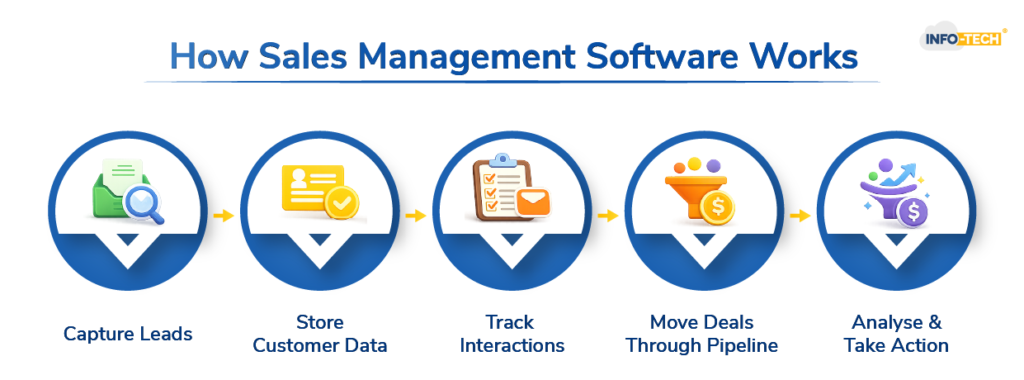
The system collects information from multiple sources, like a website form, a social media ads, or even a manual entry. That information is stored under each customer, building a kind of timeline of interactions.
As your team works on a deal, it moves through different stages. At each stage, actions are tracked such as calls made, emails sent, meetings done.
In the background, the system automatically organises this information and presents it in a structure format so You don’t have to piece things together yourself.
How AI Works With Sales Management Software?
Modern tools now include AI, but it’s not as technical as it sounds. It mostly helps to enhance efficacy and decision-making.
For example, it can look at your data and point out which leads are more likely to convert. So instead of treating all leads the same, your team can focus on the ones that matter more and are more likely to result positively.
It can also take care of repetitive tasks like sending follow-ups or updating records, without someone doing it manually every time.
Some systems even suggest what to do next based on what’s worked before. And in customer support, chatbots can handle basic queries instantly, which saves time for your support team.
Explore: How AI Is Transforming Sales Communication Today
What Are the Features of Sales Management Software and Why They Matter?
| Feature | Why It Actually Helps |
| Lead Management | Keeps all customer info in one place so nothing gets lost |
| Pipeline Tracking | Shows exactly where each deal stands |
| Activity Tracking | Helps remember every interaction without relying on memory |
| Automation | Reduces manual work and saves time |
| Reporting | Gives a clear idea of what’s working and what’s not |
| AI Support | Helps prioritise leads and suggests next possible steps |
Dive Deeper: Customer Relationship Management Software For Retention
Who is Sales Management Software Useful For?
You don’t need to be a large company to use this. In fact, smaller teams often benefit more because they feel the chaos faster.
It’s useful if:
- You’re handling multiple leads at once
- Your follow-ups are inconsistent
- Your team keeps asking for updates
- You don’t have a clear view of your sales
Final Thoughts
Sales management software is not about adding another tool, it is about improving how sales operations are managed.
As businesses grow, manual processes become inefficient and increase the risk of missed opportunities. A structured system provides clarity, consistency, and better control over the entire sales pipeline.
For organisations looking to improve efficiency, adopting a CRM software that integrates sales tracking, customer management, and workflow automation can significantly enhance both performance and long-term scalability. Book a free demo now.
Sales Management Software FAQs
What is a sales management software?
It is a tool that helps businesses organise and manage their entire sales process in one place.
Is CRM the same as POS?
No, CRM and POS are not the same, they serve different purposes even though both deal with customers. A CRM is used to manage relationships and interactions with customers over time, whereas a POS system is used to process transactions when a customer makes a purchase.
Is SFA a CRM tool?
SFA (Sales Force Automation) is a part of CRM, not a separate tool altogether.
Can ChatGPT make a CRM?
ChatGPT can help design and build a basic CRM prototype or generate code for a custom CRM, but a fully secure, production-ready CRM still usually needs developer setup, integrations, and testing.
