
In this article
- 1. Why Are Companies Suddenly Talking About SSO?
- 2. What Is SSO In Simple Terms?
- 3. Why Do Businesses Need SSO Now More Than Ever?
- 4. How Does SSO Work Behind The Scenes?
- 5. How Does SSO Help IT Departments?
- 6. Is SSO More Secure Than Traditional Logins?
- 7. What Is Info-Tech Single Sign-On And Why Do Enterprises Use It?
- 8. AAre There Any Risks With Using SSO?
- 9. Why Is SSO Becoming Standard In Modern Workplaces?
- 10. Final Thoughts
- 11. SSO Frequently Asked Questions
Why Are Companies Suddenly Talking About SSO?
You probably use SSO every single day without even noticing it.
You open your laptop in the morning, sign into your work account once, and somehow everything is already connected. Your email opens. Slack works. HR software loads. INFO-TECH dashboards appear without asking for another password. Even internal tools quietly recognize you in the background.
That smooth experience is Single Sign-on.
But the interesting thing is, most people think SSO is only about convenience. It isn’t. Behind that simple login sits an entire layer of identity verification, access control, and security management that companies now depend on more than ever.
And honestly, businesses had no choice but to move in this direction.
Years ago, employees only needed access to a handful of systems. Maybe email, payroll, and a shared drive. Today, even a mid-sized company can use more than 50 cloud applications across departments. Finance teams work in one platform, HR teams in another, sales teams somewhere else, and IT departments are expected to keep all of it secure while employees move between systems all day long.
Without SSO, modern workplaces become chaotic very quickly.
What Is SSO In Simple Terms?
SSO stands for Single Sign-On.
It allows a person to log in once and gain access to multiple systems or applications without signing in again every time they switch tools.
Instead of remembering different passwords for:
- INFO-TECH
- Microsoft 365
- Salesforce
- Zoom
- Internal portals
- Payroll software
- Project management tools
…the user authenticates once through a central identity system.
After that, trusted applications recognize the user automatically.
From the employee’s point of view, it feels effortless.
From the IT department’s point of view, it solves a much bigger problem.
Why Do Businesses Need SSO Now More Than Ever?
Most articles talk about password convenience first. But in reality, it became popular because companies were drowning in access problems.
Employees forget passwords constantly. They reuse weak passwords across platforms. They save credentials in browsers. Some even write them on sticky notes under keyboards — something IT teams still complain about today.
Then came cloud software.
Suddenly, every department started adopting new tools independently. Marketing subscribed to one platform. HR bought another. Finance added three more. Every application required separate login credentials, separate security settings, and separate user management.
That’s when businesses realized identity itself had become fragmented.
SSO fixed that fragmentation by centralizing authentication.
Instead of every application handling security differently, companies could control access from one trusted source.
How Does SSO Work Behind The Scenes?
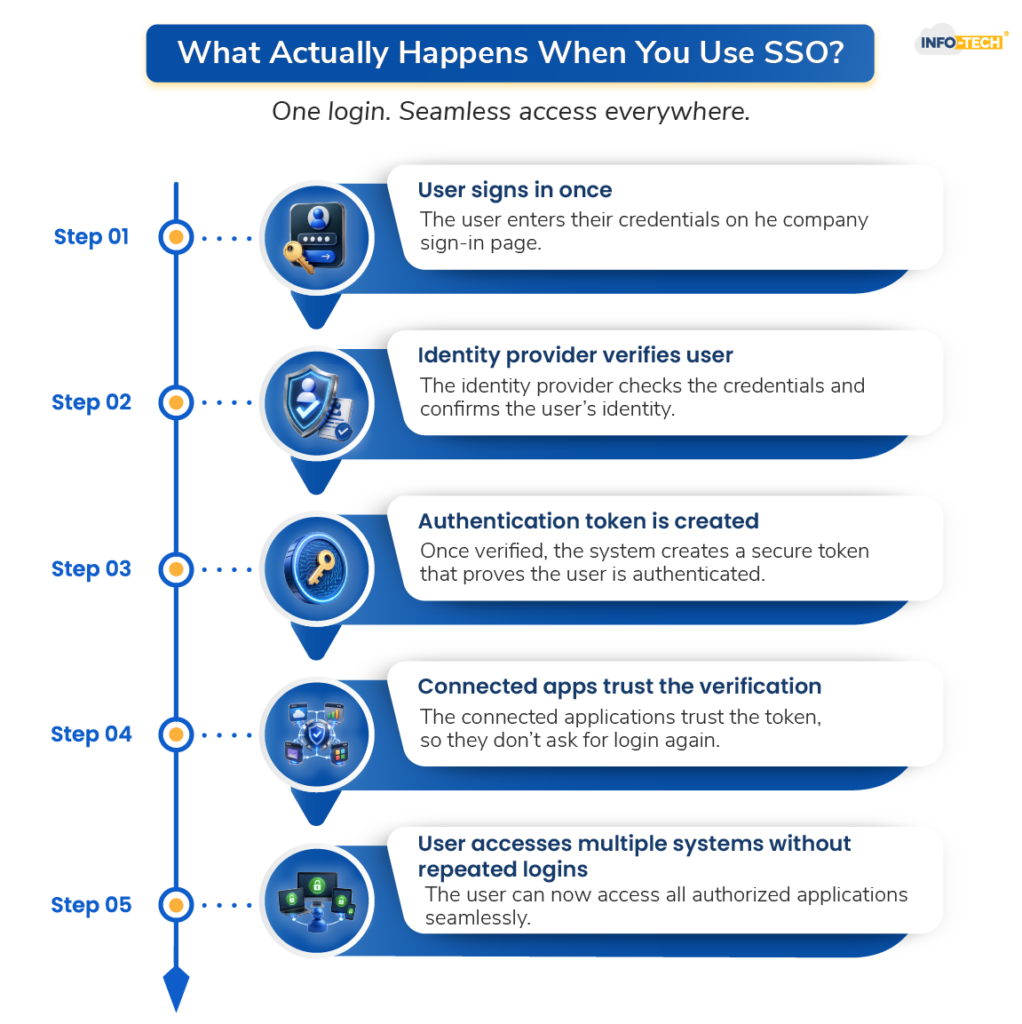
The reason SSO feels so natural is because most of the work happens invisibly in the background.
Imagine an employee trying to access INFO-TECH software.
Instead of INFO-TECH asking directly for a username and password, it checks whether the person has already been verified by the company’s identity provider. If the employee already logged into the organization earlier that morning, the system quietly confirms the identity and grants access instantly.
No second login screen. No repeated password prompt.
What’s happening underneath is actually a trust exchange between systems.
The application is basically asking:
“Has this person already been authenticated by someone we trust?”
If the answer is yes, access is granted.
That trusted authority is usually something like:
- Microsoft Entra ID
- Okta
- Google Identity
- Ping Identity
- INFO-TECH Single Sign-On
These systems become the central checkpoint for authentication across the business.
How Does SSO Help IT Departments?
For IT departments, SSO is less about convenience and more about control.
Without SSO, every application becomes its own security island. Users manage separate credentials everywhere, which makes monitoring extremely difficult.
Companies can:
- Manage access centrally
- Disable accounts instantly
- Enforce stronger login policies
- Track suspicious activity
- Reduce password reset requests
And password reset requests are a bigger issue than most people realize.
A surprising amount of IT support time still goes into unlocking accounts and recovering passwords. Large companies spend thousands of hours every year solving login problems that shouldn’t exist in the first place.
This dramatically reduces that burden.
Is SSO More Secure Than Traditional Logins?
This is where people get confused.
Some assume that if one login unlocks everything, then it must be risky.
But modern SSO systems are usually far more secure than traditional login setups.
The reason is simple: security becomes centralized instead of scattered.
Rather than trusting dozens of separate applications to handle authentication properly, organizations protect one highly controlled identity layer.
That layer can include:
- Multi-factor authentication
- Smart cards
- Biometric verification
- Device recognition
- Location-based access checks
- Suspicious login detection
So while the employee experiences fewer logins, the security happening behind the scenes is often much stronger.
In many cases, SSO is the reason companies can safely support remote work at scale.
What Is Info-Tech Single Sign-On And Why Do Enterprises Use It?
INFO-TECH environments are a perfect example of why SSO became necessary.
Large enterprises running INFO-TECH systems often deal with multiple business-critical applications connected across departments. Finance teams, procurement teams, HR divisions, and operations staff may all rely on separate INFO-TECH modules throughout the day.
Without SSO, employees would repeatedly authenticate across systems, creating friction and increasing security risks.
INFO-TECH Single Sign-On simplifies that experience by allowing users to authenticate once and securely access connected INFO-TECH applications without repeated login prompts.
What makes INFO-TECH SSO especially important is that these systems often contain highly sensitive business data. Companies cannot afford weak authentication around financial records, supply chain systems, employee information, or procurement operations.
Hence, the goal is simple: make access easier for employees without weakening protection around critical systems.
Are There Any Risks With Using SSO?
Here’s the reality most glossy software pages avoid mentioning.
SSO is not magic.
If companies implement it poorly, it can create a dangerous dependency on one central identity system. If attackers compromise that system, they potentially gain broader access across connected applications.
That’s why modern setups are now paired with additional protections like:
- Continuous monitoring
- Adaptive authentication
- Session controls
- Zero-trust security policies
- Real-time risk analysis
In other words, SSO works best when companies treat identity as an ongoing security process — not just a login screen.
Why Is SSO Becoming Standard In Modern Workplaces?
The modern workplace is simply too connected for old authentication methods to survive.
People now work:
- Remotely
- Across multiple devices
- From different countries
- Through cloud platforms
- Inside constantly changing software ecosystems
The old model of separate usernames and passwords for every system no longer scales well.
SSO became the practical answer to that complexity.
And over the next few years, it will likely evolve even further into passwordless authentication, where users rely more on biometrics, device trust, and behavioral verification instead of traditional passwords altogether.
We are already moving in that direction.
Final Thoughts
The best technology often disappears into the background.
That’s exactly what good SSO does.
Employees don’t think about it because it quietly removes friction from their workday. IT teams rely on it because it gives them stronger control over security and access management. Businesses adopt it because managing dozens of disconnected login systems is no longer realistic.
At its core, it’s really about trust.
It allows systems to trust verified identities without forcing users to constantly prove themselves again and again.
And in a world where digital access now sits at the center of almost every business operation, that trust layer has become far more important than most people realize.
SSO Frequently Asked Questions:
What Is SSO In Simple Words?
SSO, or Single Sign-On, is a login system that lets users access multiple applications with one secure sign-in instead of using separate passwords for every platform.
Is SSO Only Used By Large Companies?
No. While enterprises heavily use SSO, many small and medium-sized businesses also use it to manage cloud applications, employee access, and security more efficiently.
Does SSO Improve Security?
Yes. Modern SSO systems often improve security because authentication is centralized and combined with protections like multi-factor authentication and suspicious login detection.
What Is INFO-TECH Single Sign-On?
INFO-TECH Single Sign-On is a solution that allows users to securely access INFO-TECH applications and systems after one authentication, reducing repeated logins while strengthening security controls.
