
In this article
- 1. Why is Simple Use Important for Modern Accounting?
- 2. How is the Growth of New, Cloud-Based Accounting Systems?
- 3. Why are Simple Accounting Interfaces Important?
- 4. Turning Novices into Self-Assured Accounting Software Users
- 5. Why Infotech’s Accounting Software Helps Businesses Grow?
- 6. Frequently Asked Questions
Easy-to-use accounting tools help beginners handle money matters with trust. They make finding things simple, do tasks on their own, cut down mistakes, and show money info right away. These clear systems walk users through each step turning accounting beginners into skilled pros.
Why is Simple Use Important for Modern Accounting?
People have always thought of accounting as a tough field — one that needs years of practice technical know-how, and a solid grasp of money matters. But nowadays, companies work in a fast digital world where not everyone dealing with finances is an expert. Many small and medium-sized businesses in Singapore and nearby areas still count on new workers general office staff, or small groups to handle money tasks.
This is where new accounting software makes a big difference. As cloud tech, automation, and interface design get better, today’s accounting tools do more than just keep track of numbers — they help users, no matter their skill level, to handle money matters with ease. Easy-to-use interfaces level the playing field making it simpler for both newbies and expert accountants to work together.
Also Read: How Accounting Software Improves Accountancy in Singapore
How is the Growth of New, Cloud-Based Accounting Systems?
Old-school, in-house accounting systems were known to be hard to use — they had too many menus, layouts that didn’t make sense, and took a long time to learn. Today’s cloud accounting platforms are just the opposite. They give users a simple easy-to-grasp experience that anyone can understand.
Cloud Systems Let Users:
- Check financial data whenever and wherever you want
- Work with your team in real time
- Sync invoices, expenses, and statements without manual effort
- Keep data safe without thinking about manual backups
Cyber threats have grown a lot in the last ten years. This has led businesses to depend on cloud systems that use encryption, control who gets in, and store data . These systems get rid of the weak points you’d find with paper records or old software.
Check Out: Cloud Accounting vs. Traditional: Which Is Right for You?
Why are Simple Accounting Interfaces Important?
A good accounting interface isn’t just about looking nice. It aims to help users do tricky money tasks without getting lost — even if they’re new to accounting. For small and medium businesses where people often do many jobs, an interface that’s easy to use becomes a big plus.
Here’s a complete breakdown of how easy-to-use interfaces change accounting for regular folks.
1. Easy for Everyone
A simple accounting system makes sure even total newbies can find their way around key features. Clear menus well-organized sections, and tidy layouts help users handle bills, keep track of spending, or update records without needing lots of training.
Why It’s Important
- Cuts down reliance on just one accountant
- Let’s owners and managers check financial info on their own
- Makes it much easier to bring new staff up to speed
- Cuts down on training time and makes learning faster
When users get the hang of the system, they can do tasks with confidence — a big plus in fast-paced business settings.
2. Better Workflows for Quicker, Smarter Operations
New accounting software cuts out manual work by automating repetitive jobs. Easy-to-use interfaces add to this by putting tools and functions in sensible order letting even new users finish tasks without trouble.
Examples of Better Workflows
- Auto-created invoices and reminders
- Grouped expense tracking
- Bank feeds that match transactions on their own
- Financial statements made
This setup helps cut down mess, make sure things are right, and keep all money info tidy in one spot.
3. Up-to-Date Insights That Help Make Better Choices
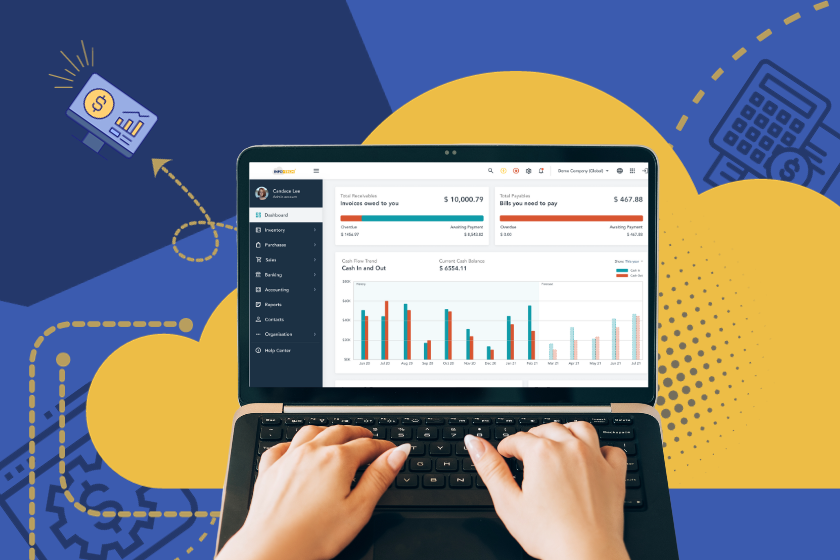
Modern accounting software has dashboards showing quick financial summaries. Even beginners can understand visual cues, graphs, and number breakdowns without needing deep money knowledge.
Real-Time Insights Let Businesses:
- See cash flow right away
- Keep tabs on unpaid bills
- Check profits by project, client, or month
- Spot money problems
This easy access helps business owners make smart choices fast even if they’re not money experts.
4. Fewer Mistakes Through Easy Guidance
Errors in hand calculations or spreadsheet formulas happen often — and can cost a lot. User-friendly accounting systems cut these risks way down. They have guided fields, auto-calculations, and warning prompts that stop mistakes before they start.
How Easy-to-Use Interfaces Cut Down on Mistakes
- Required fields make sure all data is entered
- Automatic calculations stop wrong math
- Warnings tell users about missing or mismatched info
- Step-by-step guides keep processes on track
This guidance is priceless to beginners. It helps them get accounting steps right while shielding the company from expensive slip-ups.
5. Built-In Help and Learning Tools
New users often find financial systems scary. User-friendly accounting software helps by offering step-by-step guidance short help articles, and in-system hints that explain each feature.
Help Systems Have:
- Tooltips and tutorials within the app
- Round-the-clock help from the software company
- Resource centers and knowledge libraries
- AI assistants and step-by-step guides
This easy access to help gives users the confidence to try new features and build their accounting skills.
Learn More: Importance of Cybersecurity in Accounting Software
Turning Novices into Self-Assured Accounting Software Users
User-friendly accounting software has a lasting effect. What starts as guided learning grows into full self-reliance. Users learn through practice — with systems that make tasks easier and handle complex operations.
Companies Gain From:
- Less need for specialized employees
- Quicker training of new staff
- Fewer mistakes and better precision
- More efficient financial processes
- Better-informed choices
User-friendly software acts as both a teacher and a support system allowing beginners to become skilled accounting professionals.
Dive Deeper: Rising Demands for HR and Accounting Software
Why Infotech’s Accounting Software Helps Businesses Grow?
Infotech’s Accounting Software is built to be easy to use, accurate, and to give real-time views of finances. Its simple layout helps new users learn fast, while experienced users get value from strong dashboards, automation, and safe cloud storage.
Key Advantages Include:
- Simple navigation and clean layouts
- Automated math and bank matching
- Up-to-the-minute dashboards and reports
- Safe cloud-based access
- Round-the-clock customer support
Whether you’re just starting in accounting or leading a growing team, InfoTech makes every step easier — helping you change from a beginner into a sure quick accounting user.
Keep Reading: Accounting Software to Boosts Efficiency & Time Saving
Frequently Asked Questions:
Why does accounting software need an easy-to-use interface?
An easy-to-use interface helps new users grasp financial tasks , cuts down on mistakes, makes work faster, and boosts overall accounting productivity.
Can accounting software that’s easy to use cut down on mistakes?
Yes. Automatic features, step-by-step forms, and built-in checks lower the human errors often seen in manual bookkeeping.
Is cloud accounting a good fit for newcomers?
Cloud accounting works well for newcomers as it offers automatic features simple navigation safe data storage, and the ability to access from any device.
How does user-friendly accounting software boost productivity?
It has a streamlining effect on workflows, makes routine tasks automatic, and gives financial insights in real-time, which lets users work quicker and with more precision.
Can accounting novices manage finances using simple software?
For sure. With easy-to-use tools, step-by-step workflows, and help resources, newcomers can handle accounting jobs with confidence without needing to be experts.
