
Introduction: Leave Compliance Challenges for HR Teams
HR teams in Singapore face more than just keeping track of time off when it comes to managing employee leave. They must also ensure they follow the strict rules set by the Ministry of Manpower (MOM). Different types of leave such as yearly leave, maternity leave, and childcare leave, each have their own set of regulations to follow.
That’s why many HR managers and business owners use the MOM Leave Calculator. This official online tool has the purpose to determine statutory leave entitlements. But here’s the problem: while it’s useful for single checks, it soon becomes impractical to manage entire teams.
In this guide, we’ll explain how the MOM Leave Calculator works, what it can’t do, and why smart companies are moving to digital leave management systems like Info-Tech’s Leave Management Software.
What Is the MOM Leave Calculator?
The MOM Leave Calculator is a free tool that Singapore’s Ministry of Manpower offers to help employers and employees calculate statutory leave entitlements.
With this tool, you can figure out:
- How much yearly leave you get
- Time off for new moms
- Time off for new dads
- Leave to care for kids
- Extra time to look after children
The MOM Leave Calculator is a free online tool from MOM that works out legal leave allowances like new parent, and childcare time off.
Steps to Use the MOM Leave Calculator
It’s easy to use the calculator. Here’s what to do:
- Go to the MOM Website Visit MOM’s main site and find the Leave Calculator in e-services or Employment Practices.
2. Put in Employee Info Type in basic details like citizenship when you started, and what kind of job you have.
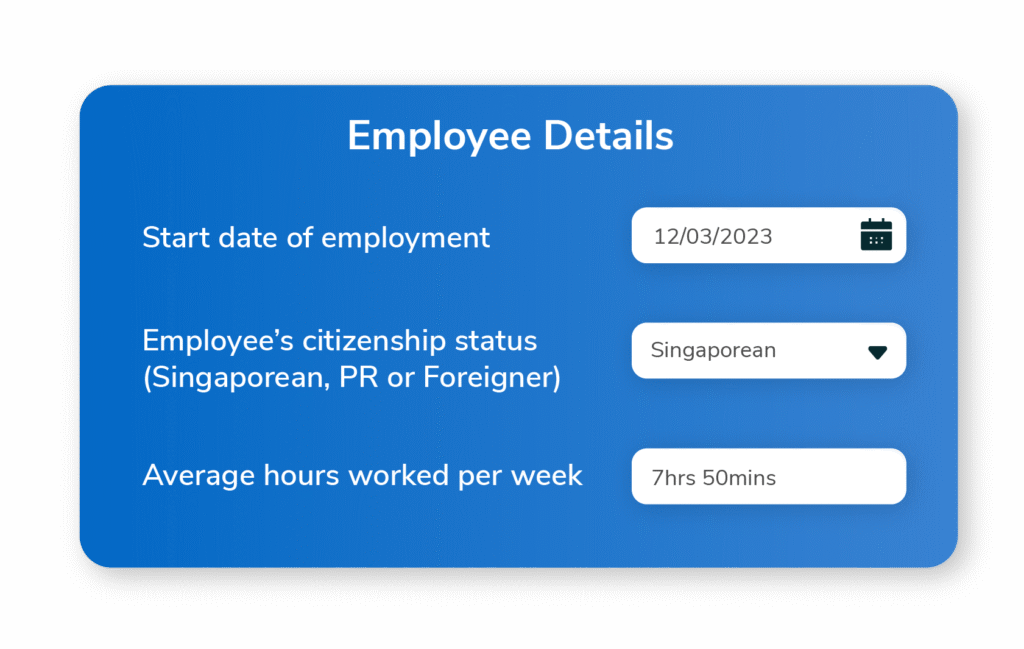
- Pick Your Leave Type Select the kind of leave you want to figure out , for new moms, for new dads, or to care for kids.
- Check the Results The tool shows how much leave you can take based on what MOM says. For instance: A Singapore citizen might get 16 weeks off when they have a baby.
Quick Summary: Just put in employee info and leave type, and the MOM tool tells you right away what you’re owed.
Drawbacks of the MOM Leave Tool
Though handy, this tool isn’t made to handle leave for whole teams or big companies.
Main Drawbacks:
- Lacks Centralized Tracking – You need to input employee data each time.
- Doesn’t Connect with Payroll – HR has to update salary deductions or reimbursements by hand.
- Not Suitable for Bigger Teams – When you have over 50 employees manual data entry takes too long.
- Can’t Show Up-to-Date Balances – You’re unable to keep track of remaining leave in real time; it calls for separate spreadsheets.
The MOM Leave Calculator works well for quick checks but falls short when it comes to handling multiple employees or linking up with payroll.
The Reasons HR Teams Are Switching to Digital Leave Management Systems
To address these shortcomings many SMEs are adopting automated leave management tools. Info-Tech’s Leave Management System stands out as one such solution built to comply with MOM regulations and boost day-to-day productivity.
Advantages of a Digital Leave Management System:
- Automated Leave Calculation – Computes based on employee profile, job schedule, and qualifications.
- Instant Monitoring – Employers and employees can check balances at any time.
- Payroll Connection – Leave changes sync with payroll without manual input.
- MOM Adherence – Stays current with the newest statutory guidelines.
- Employee Record Linking – Unified tracking connected to each employee’s HRMS profile.
Past vs. Present: Old-School vs. Smart Leave Tracking
Traditional Method (Manual + MOM Calculator):
- HR enters data for each employee.
- Spreadsheets track leave.
- Errors, duplication, or missed compliance pose a significant risk.
Modern Approach (Info-Tech’s System):
- Leave balances receive automatic updates.
- Web or mobile platforms manage approvals.
- MOM audits benefit from created reports.
A digital leave system allows automatic updates of leave balances and payroll synchronization removing manual errors.
Closing Thoughts: Effective HR Depends on Effective Tools
The MOM Leave Calculator helps with quick checks, but it lacks the capability to handle daily HR tasks. As your company expands outdated tools can slow down operations and increase the chance of compliance issues.
Info-Tech’s Leave Management Software gives HR teams a way to make leave tracking easier, keep up with MOM rules, and work with payroll and attendance systems. This tool doesn’t just help out — it also keeps you on the right side of the law.
Want To Stop Tracking Leave by Hand? Ask for a Demo Now!
Frequently Asked Questions:
What is the MOM Leave Calculator?
The MOM Leave Calculator is a tool you can use for free online. Singapore’s Ministry of Manpower created it to figure out how much leave employees should get by law. This includes leave, time off for new moms and dads, and leave to care for kids.
How can I find the MOM Leave Calculator?
Go to the MOM website, look for e-services, and pick the Leave Calculator under Employment Practices.
What can’t the MOM Leave Calculator do?
It doesn’t keep tabs on leave across teams, link up with payroll, or show up-to-date balances. It’s for quick, one-time checks.
What makes a Leave Management System good for companies?
A system does the math , works with payroll, sticks to MOM rules, and lets you see employee leave in real time.
Does Info-Tech’s Leave Management Software follow MOM rules?
Yes. It gets regular updates to match Singapore’s newest job laws, so it stays accurate and follows the rules.
